Didji: 100% private by design.
Serious security. Silly-easy.
Only you can open your vault; Apple can’t open it. We can’t open it. Bank-level security for your most sensitive information.
Here’s how, in plain words.
No master password to forget
Many password apps make you invent and remember a master password. Didji doesn’t. A little less to remember. For everyone.
iCloud Keychain
Its key is made for you on your first device and kept safely in your iCloud Keychain, which carries it to your other devices, signed in to the same Apple Account, and nowhere else.
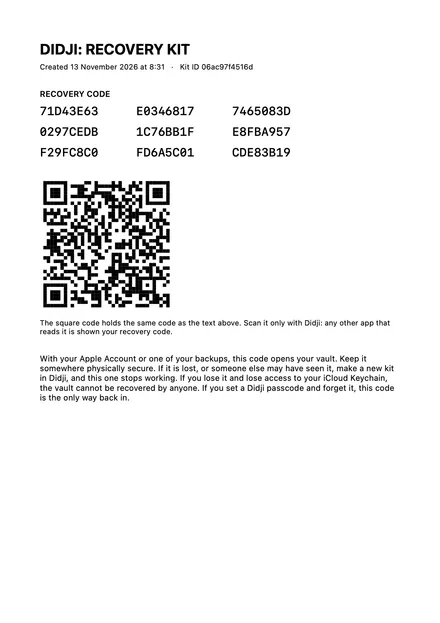
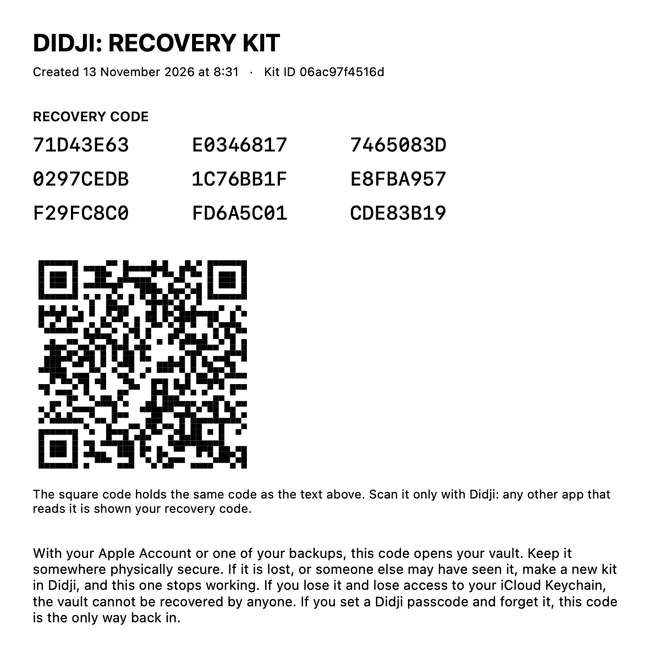
Your recovery kit opens a copy of the key, kept in iCloud and in your backups. Keep it as you would a passport, and if it’s ever lost, make a new one.
Locked before it leaves your hand
Everything you keep in Didji is locked on your device before it’s stored, so iCloud only ever holds the locked data.
On your iPhone
Once you’ve unlocked Didji, it’s all there for you: every password, note, document and photo.
In your iCloud
- A record exists
- Under 1 KB
- Last changed November 3
iCloud keeps your vault, locked with your key. It can see how many records you have and which belong together, roughly how big each is, when it was made and last changed, and who you share with. Never what is in it.
At Didji Studios
Didji has no servers and no account to sign in to. We hold nothing of yours: nothing to lose, sell or hand over.
Your phone, someone else’s hand
Add a Didji passcode, and even someone who knows your phone’s passcode can’t get in. Five wrong tries start a wait.
Locked with your key
- Passwords, passkeys and sign-in codes
- Titles, labels, category names and notes
- Documents and photographs
Only that key can open it. Didji Studios never holds anything at all.
No servers, no account
Didji has no servers and no account to sign in to.
So there’s no Didji account to break into, and no company server holding your vault. Your vault is in your own iCloud, and your backups are files you keep.
Nothing to break into here
Didji has no servers and no account to sign in to.
Locked before it’s stored, opened only on your devices. That’s the whole of it.
A passcode of its own
It opens with Face ID or Touch ID. Add a Didji passcode, and even someone who knows your phone’s passcode can’t get in.
- Five wrong tries start a wait, from thirty seconds up to an hour. Nothing is ever erased by typing.
- Your Didji passcode is never stored, in your vault or anywhere else.
- Didji locks itself when it hasn’t been used for a while. You choose how soon, and you can always lock it at once.
- With Lock when face down switched on, turn the phone face down on a table, and Didji locks.


Enter your Didji passcode
Nothing is ever erased by typing.
Pay once, for the whole family
Buy Didji once, and everyone in your Apple family has it too, on their own devices, through Family Sharing.
Up to six people get Didji through Family Sharing, you included. And any record can be shared with up to 20 people, who don’t need to buy Didji to see it.
Everyone keeps a private vault of their own, locked with their own key. No family plan, and nothing to pay each year when you pay once.
 Sam
 Alex
 Leo
 Mia
 Grandpa Arthur
Sharing uses a key of its own: each person you share with gets a separate space, sealed under its own key, handed over in the invitation.
What leaves your device
Works with Airplane Mode on.
Apart from iCloud keeping your devices in step, and the App Store, which Didji asks whether you have bought it each time it opens, Didji talks to nothing on the internet but through four switches, each saying exactly what it sends.
Everything that can leave Didji fits on four postcards
The first five characters of a scrambled code, shared by thousands of passwords. Never the password.
Sent after you unlock, over Wi-Fi, for passwords not yet checked, and for all of them about once a month.
Public lists about websites, downloaded whole. Nothing about you.
Sent after you unlock, over Wi-Fi, about once a week.
The address on the record you’re looking at, so Apple can place it and draw the map. Not tied to your Apple Account.
Sent once for each address, when you open a record that has one.
Each website is asked for its own logo, so the Wi-Fi you’re on can see which sites you use. No other company is told.
Sent after you unlock, over Wi-Fi, for sites still without a logo, and when you open a login.
Four postcards, each with its own switch. You see all four when you set Didji up.
Everything else stays with you: every record, every document, every photo. The only other journeys are to your own iCloud (your vault, locked, and your key, inside iCloud Keychain), to the App Store, which Didji asks whether you have bought it, and to your Apple Watch, if you send records to it.
You see all four when you set Didji up, on unless you turn them off there, and nothing is sent before then.
Your vault doesn’t depend on us. It lives with you.
Your information, your control
- What if I lose my phone?
- Nobody can open Didji on it without your face, your fingerprint or your passcode (your Didji passcode, if you’ve set one, or else your phone’s), and everything inside is locked. The phone holds a copy of your vault, and while Didji syncs through your iCloud your other devices hold it too, so nothing is lost with the phone. Open Didji on another of your devices, or on a new phone signed in to the same Apple Account, and it’s all there. Find My can lock or erase the lost one: erase it if somebody might know its passcode. If Didji isn’t syncing with iCloud, a backup and your recovery kit are what bring your vault back. I’ve lost my phone, or it was stolen
- What if I lose my recovery kit?
- Make a new kit and check its printed code, and the lost one stops working. In Settings, under Devices & data, tap Recovery kit & vault key, then Make a new recovery kit. Nothing in your vault changes. Backups you made before still open with the old kit, but only show what was in them that day, so make a new backup too. Making a new recovery kit
- What if Didji disappeared?
- Didji would keep working on your devices. It has no server and no account, so there’s nothing of ours your vault needs. Your vault is in your own iCloud, and your backups are files you keep. If Didji disappeared tomorrow
- Can I take my information out?
- Yes, whenever you like. Export, in Settings under Devices & data, sends your records straight to another password manager, or saves them as a spreadsheet any app can read. Backing up
What if Didji Studios disappeared tomorrow?
For the curious
Here’s exactly what stands between your secrets and everybody else.
What iCloud can still see
- How many records you have of each kind, and which belong together
- Roughly how big each one is
- When each one was made and last changed
- If you share: who with, and how many records
Never what is in them.
What rests on Apple
Two things rest on Apple rather than on Didji. The key is only as safe as your iCloud Keychain, which Apple locks so that even Apple can’t open it. And with AutoFill on, iOS keeps the website names and usernames of your logins on your phone, so it can offer them above the keyboard; never a password.
How the breach check works
On your phone
biscuit-sofa-7
The password
Scrambled on your phone
0C3D8E76FA2149129A2C98797BD2279CE7562340
Its SHA-1 code: 40 characters, made on your phone. The first five are all that’s sent.
Only this leaves
PhoneHave I Been Pwned0C3D8
About two thousand different passwords share those five characters.
Checked on your phone
Your phone looks for the rest of its code:
E76FA2149129A2…E70FE36CC676EB…1E727DC4436EFD4…22E73A8C16E04B7F…9E77C706EC56B7A…15E7A019F296617A…3
…and 2,109 more
No match: this password doesn’t appear in a known breach.Have I Been Pwned only ever saw “0C3D8”: never the password, nor its whole code.
On your phone
password123
The password
Scrambled on your phone
CBFDAC6008F9CAB4083784CBD1874F76618D2A97
Its SHA-1 code: 40 characters, made on your phone. The first five are all that’s sent.
Only this leaves
PhoneHave I Been PwnedCBFDA
About two thousand different passwords share those five characters.
Checked on your phone
Your phone looks for the rest of its code:
C6008F9CAB4083…C5DE2D08BADD5F…20C5ED33E0DCF809…59C6008F9CAB4083…2,266,543← yoursC6336DEAF4B46A…52C698A1F8D91725…14
…and 1,967 more
Match found: seen 2,266,543 times in known breaches. Change this password.Have I Been Pwned only ever saw “CBFDA”: never the password, nor its whole code.
An illustration with two example passwords. The scrambled codes are real, and so are the answers: the service’s own on November 8, 2026, shortened. This page sends nothing anywhere.
Each record is sealed to its place: its kind, its identity, the record it belongs to and its revision are sealed in with it.
Home Wi-Fi
Netflix
Opens only in its own place.
Your recovery code is your kit’s own key, with a short check added at the end, so one character typed wrongly is caught rather than becoming a different code.
Your recovery code (EXAMPLE)
00112233445566778899AABB
CCDDEEFF0011223344556677
8899AABBCCDDEEFFC073F154
It adds up.
- Kit ID
208f2bd557ed
Enough to tell keys apart, and nothing that helps anybody find one.
The lock
Every record is sealed with AES-256-GCM under one 256-bit key made on your first device. Titles, labels, category names and notes are sealed as well as the passwords: nothing you keep in Didji can be read without the key.
Each sealed record is also bound to its own place. Its kind, its identity, the record it belongs to and its revision are authenticated with the ciphertext, so a sealed record moved onto another record, or an attachment moved to another record, fails to open rather than being read in the wrong place.
The key
The key lives in your iCloud Keychain, which Apple protects end to end, and is synchronized only to devices signed in to your Apple Account. That is the one promise Didji borrows rather than makes: "Apple can’t read it" holds for your vault because the key travels only inside the Keychain’s end-to-end encryption, which is Apple’s to keep.
Your recovery kit holds a key of its own: 32 bytes, with four bytes of a SHA-256 checksum taken over a prefix of the kit’s own, so a single character typed wrongly is caught and a kit’s code is never mistaken for the vault key’s. The kit key opens nothing itself. It unwraps a copy of the vault key, sealed with AES-256-GCM and kept in your iCloud and in each backup. A new kit seals that copy again under a new kit key, and once its printed code has been checked, the old kit’s copy is gone. Each backup has a key of its own, sealed under the vault key and the kit of its day, so an old kit opens only the backups of its day. The Key ID and the Kit ID are each the first six bytes of a SHA-256 fingerprint: enough to tell keys apart, and nothing that helps anybody find one.
The Didji passcode
A Didji passcode is never stored. What is kept, sealed in the vault with your other preferences, is a verifier: a random 16-byte salt and PBKDF2-HMAC-SHA256 over the passcode with 600,000 rounds, compared in constant time. Checking one takes about a third of a second, by design; wrong tries are counted in the vault, five of them start a wait that doubles up to an hour, and nothing is ever erased.
Backups
A backup carries a sealed manifest of everything in it. Before anything is restored, the whole file is checked against that manifest, and a file with anything added, removed or changed is refused outright.
Sharing and Apple Watch
Sharing never uses your own key. Each person you share with has a separate space, sealed under a key of its own that is handed over in the invitation. An Apple Watch is given a key of its own too, so the vault’s key never reaches your wrist.
Breach checks and passkeys
The breach check sends Have I Been Pwned only the first five characters of a password’s SHA-1 hash, and compares the two thousand or so answers that share them on your phone, so nobody, not even the service, learns which password was checked. Passkeys are P-256 keys sealed in the vault, used only to sign for the site they were made for.