

For iPhone, iPad, Mac and Apple Watch
Most password managers stop at passwords. Life doesn’t.
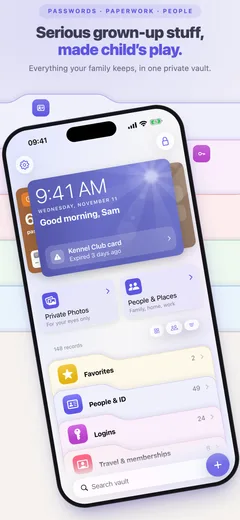
Serious grown-up stuff, made child’s play.
Let’s get organizedWith
Passwords, paperwork, and the people they belong to. A family vault, or simply yours, that helps when life changes.
How Didji helps
The film opens on Didji, a small robot, asleep beside his name. A round window opens onto the Taylors’ kitchen, somebody asks for the Wi-Fi password, and Didji opens one eye and says “I can help with that.” Then the kitchen fills the picture. A cartoon film of one morning in the Taylors’ kitchen, shown twice. First, everyone asks Sam for something at once, the boiler goes with a bang, and the drawer of papers bursts all over the room. Then Sam meets Didji on her phone, and her passwords and papers go in. A little while later the same things are asked, and Didji has each answer: the Wi-Fi as a code to scan, Mia’s passport number, the plumber for the boiler, and the bank sign-in filled in with Face ID. That night the house goes dark and Didji sleeps on the locked phone. The film ends on Didji and an invitation to start a free 30-day trial.
What’s said
- Every family has one person who knows where everything is.
- And one drawer.
- Sound familiar?
- Meet Didji.
- Passwords first. They come across in one go.
- Then everything from the drawer, saved in Didji.
- Everyone gets a page. Even Biscuit the dog.
- A little while later, with Didji in your life.
- Didji keeps the answers.
- And tells you what is due.
- The boiler’s record knows who to call.
- And yes, Didji fills in your passwords.
- Only you can open Didji. No one else.
- Let’s get organized with Didji.
- Your family’s information, finally in one place.
- Serious grown-up stuff. Made child’s play.
- Start your free 30-day trial.
On every device
The same vault on your iPhone, iPad and Mac, kept in step through your own iCloud, and the records you choose on your Apple Watch. Family Sharing gives everyone their own Didji. Then share the records you choose.
- Didji for Safari: a button of its own beside the web address, on iPhone and Mac
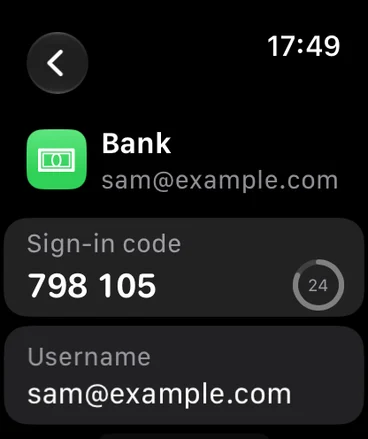
- Sign-in codes and chosen records on your Apple Watch
- Buttons in Control Center and on the Lock Screen
- Shortcuts for Siri and the Action button
- Home Screen widgets
- iPad and Mac, with more room to spread out
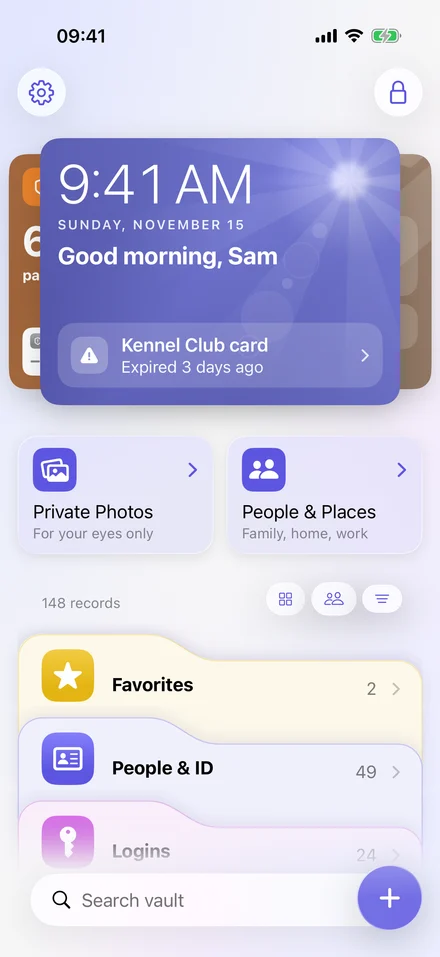
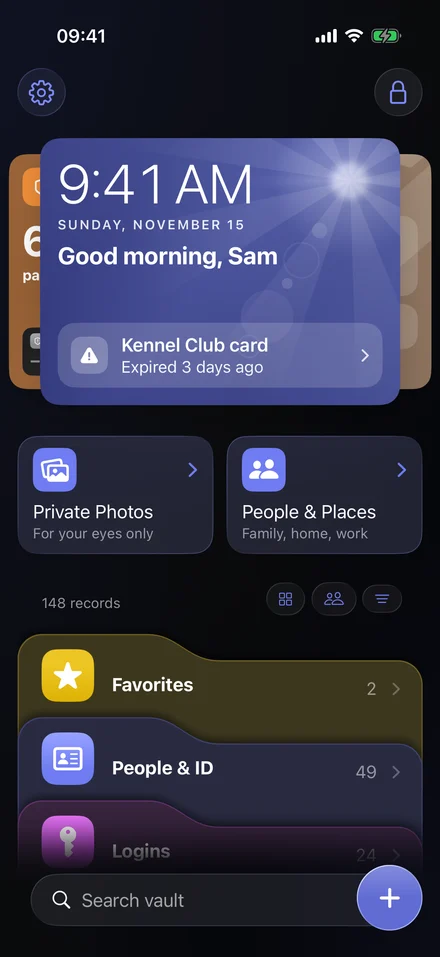
- Didji for Safari: a button of its own beside the web address
- Apple Watch: sign-in codes on your wrist
- Control Center: Lock Didji, New record and more, on the Lock Screen too
Share with up to 20 people, and it’s free for every one of them.
People & places
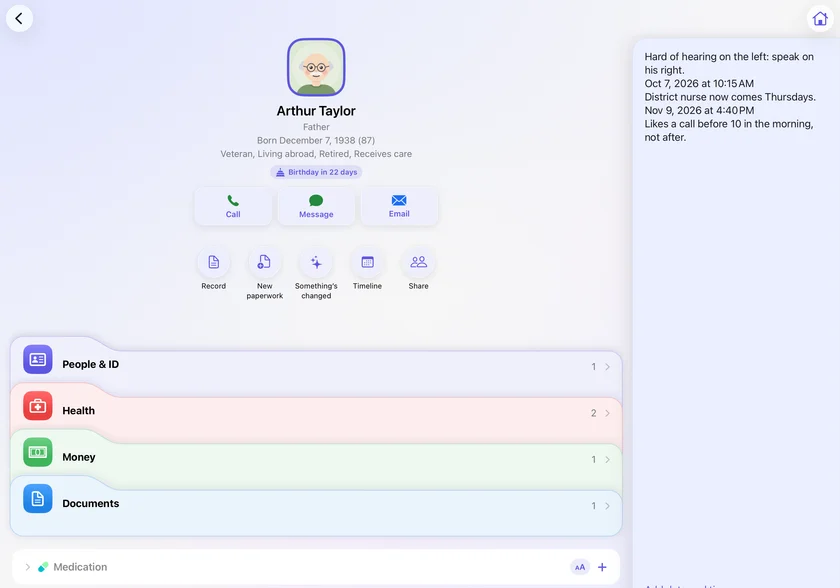
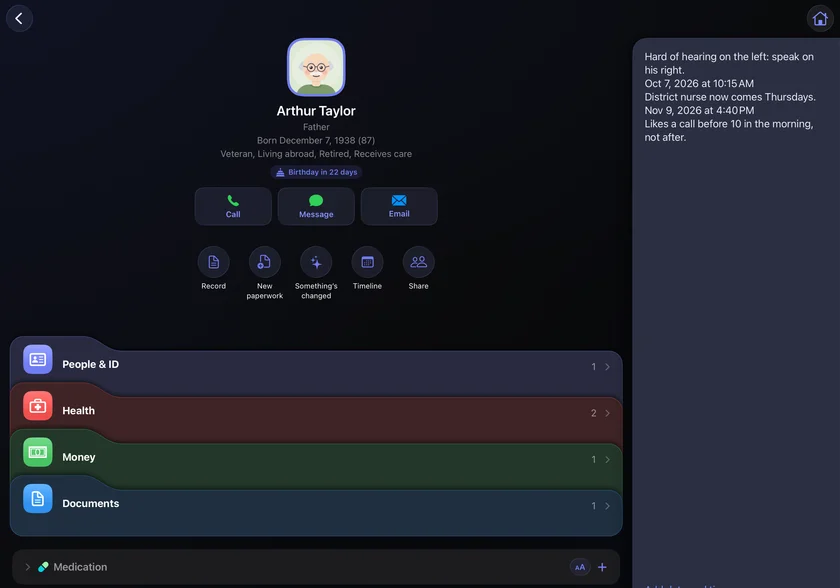
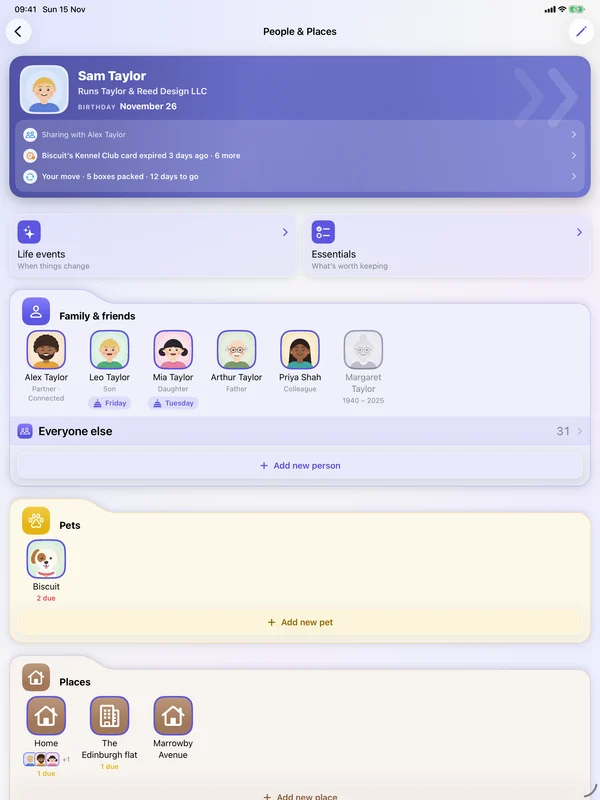
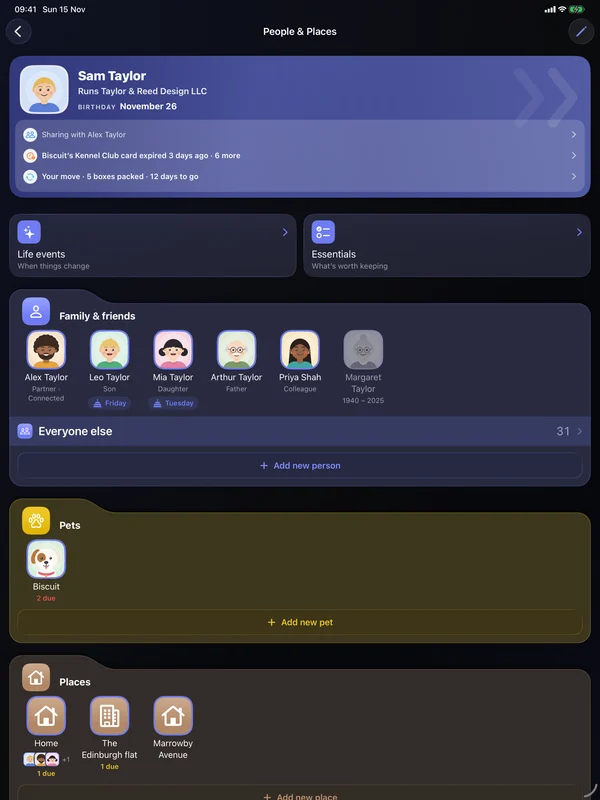
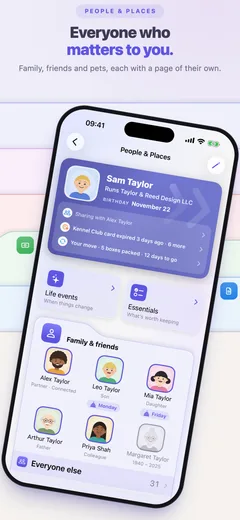
Important information belongs to people, places and things. In Didji, everyone you look after, the pets included, has the records that belong to them. So do homes, rooms and what’s in them, from the boiler service to the router.
- A page for each person, pet, home and thing, with its records on it
- Link two records, and each one shows the other
- A contacts book that holds the lot: birthdays, relationships, documents and what’s due
- Share anyone’s records with the people who help, from their page
Tap anyone to see their records. On Sam’s, show the link.
Sam’s records
- Sam’s passportBritishExpires in 7 weeks
- Sam’s driving licenceValid for over 2 years
- Carer’s AllowanceCaring for Arthur
- DentistLinden Hill Dental
The whole family
One purchase, for everyone in your family
Buy Didji once, and everyone in your Apple family has it too, on their own devices, through Family Sharing. No family plan, and nothing to pay each year when you pay once.
Just you? Didji is every bit as good for one.
6 people get Didji with one purchase, you included
Everyone in your Apple family has Didji through Family Sharing, and each of them keeps a private vault of their own.











Sharing
Free for everyone you share with
Give the dog walker Biscuit’s details and the gate code, the babysitter the Wi-Fi, your brother Dad’s care plan. They get Didji from the App Store, scan your code, and see just what you’ve shared. There’s nothing for them to buy, and no trial to start.
- Up to 20 people, and the people who share with you don’t count
- They open, copy and fill what you share, and AutoFill offers its passwords
- Change a record, and their copy changes too. Only you can change it
- Sent the code as a picture? They share it straight to Didji
- Stop sharing whenever you like, and it goes from their Didji
A short cartoon film. In the Taylors’ kitchen, the fridge is covered in notes for Ollie, Biscuit’s new dog walker: the gate code, where the key lockbox is, his food, the vet’s number. Sam imagines Ollie at the gate in the rain with a soggy note. That evening on the doorstep, Sam shows Ollie a code on her phone and he scans it with his. In Didji, Sam shares Biscuit, the back gate and the key lockbox with Ollie, and on his phone they arrive: free, with nothing to buy. Next morning in the rain, Sam has changed the gate code, and Ollie’s Didji already has the new one. The gate opens and Biscuit bounds out, barking. In the park, with his own dogs around him, Ollie taps to start a Didji of his own. The film ends on Didji’s icon and name.
What’s said
- Ollie starts walking Biscuit tomorrow.
- Sam connects with Ollie, in person.
- Free for Ollie. Nothing to buy.
- Sam changed the code last night. Ollie’s Didji already knew.
- Then Ollie wanted one of his own.
- Share with up to 20 people. They don’t need to buy.
Two phones. On Sam’s, a sharing code for Owen Haskell, the Taylors’ dog walker. Owen opens Didji for the first time, taps Been sent a sharing code?, scans it and accepts. Sam’s Didji asks “Is this Owen Haskell?” and Sam connects. Sam shares Biscuit, the back gate and the key lockbox, and they arrive on Owen’s phone under “Shared by Sam”: free, with nothing to buy.

No rush. A drawer at a time, or whenever a letter turns up.
Passwords and passkeys
What’s the Wi-Fi password?
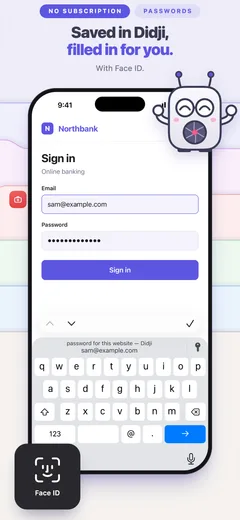
Filled in for you in Safari and in apps, with sign-in codes built in.
- Face ID or Touch ID before anything is filled in
- Filled in from the bar above the keyboard, or from your list
- A new login saved as you sign up, and updated when you change the password
- One login that fills on every site it lists
- Passkeys made in Didji, and signing in with them
- Sign-in codes set up by scanning a QR code, and filled in for you
- On iPhone, hold any text field to fill it from Didji
- Sign-in codes on your Apple Watch too
- Your passwords brought over from another app
- A Wi-Fi network shown as a code to scan
- Exposure Check: weak, reused and breached passwords, worst first
A short cartoon film of the Taylors’ kitchen. Priya, Sam’s colleague, arrives with her laptop and asks for the Wi-Fi password. Nobody remembers it, and the sticker on the router is too small to read. Sam opens Didji on her phone, finds Home Wi-Fi and shows it as a QR code. Priya’s phone scans it and her laptop joins. The film ends on Didji’s icon and name.
What’s said
- Friends always ask.
- Nobody remembers it.
- Didji keeps it.
- Share the Wi-Fi without reading out a password.
- Your passwords, and everything else.
Private photos and videos
- A drawing of a walk with Biscuit: green hills under a blue sky.
- A drawing of Biscuit, the Taylors’ white dog with one brown ear, sitting on the grass beside a red ball.
- A drawing of a beach in Cornwall, with the sea and the sand.
- A drawing of ice creams on a day out in Cornwall.
Photographs and videos of your own, kept in the vault. Take them in Didji, so they never go to Apple Photos, or bring them in from Apple Photos.
Keep an album covered, and its pictures stay blurred until you choose to show them. Handy when you’re showing someone the Wi-Fi password.
- Put your albums in the order you want
- Save any of them to Apple Photos when you choose
- Kept in your Didji backup, videos included
Cards and paperwork
Passports, licenses, insurance, warranties, letters. Scan them, or bring them in from Files and Photos, and Didji keeps them ready, with a reminder before anything expires.
Mia’s passportFilled in from the scan
- Passport number
- 564738291
- Surname
- TAYLOR
- Given names
- MIA
- Nationality
- British
- Date of birth
- Mar 14, 2017
- Date of expiration
- Dec 23, 2026
- Scan the lines at the foot of a passport’s photo page, and its details are filled in
- Scan a payment card’s number, dates and name with the camera
- Keep each scan with the record it belongs to
What’s Mia’s passport number?
The school needs it for the trip. It’s on Mia’s page in Didji, with everything else that’s hers.
A short cartoon film of the Taylors’ hallway. Mia runs in from school with a letter about a trip to France, and the form asks for her passport number. Nobody knows it, and the drawer of papers spills everywhere. Sam opens Didji on her phone: People & Places, Mia’s page, and Mia’s passport, where she shows the number. Sam writes it on the form, the form gets a check mark, and Mia skips off upstairs with it. The film ends on Didji’s icon and name.
What’s said
- The school needs it by Friday.
- Nobody knows it by heart.
- Didji keeps it with Mia.
- Everyone’s documents, with the person they belong to.
Where’s the boiler warranty?
Scan a letter with the camera, or bring in a PDF or photo, and it’s kept on the boiler’s record, with the receipt.
Ways in
- Scan with the camera
- Bring in from Files
- Add from Photos
Read on your iPhone, never sent anywhere.
Documents
Didji reads the words inside, right there on your iPhone, so search finds it, even when the file is called scan_0412.
Mia’s passport expires in a month
And it’s no surprise. Didji knows when every passport, license and insurance policy in the house is due, and says so in good time.
The next twelve months
His card’s in his coat. Upstairs.
Hold the card in Didji to turn it over, and tap the number to copy it.
A short cartoon film of an evening on the couch. Alex is buying something on his laptop, but his card is in his coat upstairs, and Biscuit is asleep on his feet. He opens Didji on his phone, holds his card to turn it over to the number on the back, and taps to copy it. The order goes through, and Biscuit sleeps on. The film ends on Didji’s icon and name.
What’s said
- His card’s in his coat. Upstairs.
- And Biscuit is comfy.
- Hold to turn it over. Tap to copy.
- Your cards, ready when you need them.
Payment cards
Your cards, drawn as cards
The front shows what’s on the front. Turn it over for what a checkout asks for, and it turns itself back after ten seconds.
Press and hold the card to turn it over.
Six quick questions before we go on. There are no wrong answers.
A quick quiz
How much of your life is at your fingertips?
The everyday things somebody asks you for, usually at the worst moment. How many could you answer right now?
Impressive. You carry it all in your head. I’d keep a copy too, for the day somebody else needs to know.
Not bad at all. The rest is in a drawer, an inbox or an app somewhere. I’d keep it all in one place, and tell you before anything runs out.
Don’t worry: nobody can keep all this in their head. That’s what I’m for. I keep it, and I tell you before anything runs out.
Your answers stay on this page, and are gone when you leave it.
Locked before it’s stored, opened only on your devices. That’s the whole of it.
Yours alone
Only you can open it. Not even we can.
Locked before it leaves your hand
Everything you keep in Didji is locked on your device before it’s stored, so iCloud only ever holds the locked data.
No servers, no account
Didji has no servers and no account to sign in to.
A passcode of its own
It opens with Face ID or Touch ID. Add a Didji passcode, and even someone who knows your phone’s passcode can’t get in.
If Didji Studios disappeared tomorrow, Didji would keep working on your devices, and you could still export your records to another password manager or a spreadsheet.
How Didji keeps it safe, in detailLook around first
Meet the Taylors
An ordinary family, with ordinary life admin. This is their house, and the same household you can explore in Didji’s demo, with a short tour, before you put anything of your own in. It doesn’t use up your trial.
Tap a room to see what Didji knows about it.
KitchenDownstairs
- Shutoff valveUnder the sink, behind the bleachNote
- RefrigeratorGoing to the new houseComing
- DishwasherStays with the houseStaying
Pay once
Pay once. Keep it.
No subscription needed, and nothing held back to make you pay.
Over 5 years
- Didji
- Paid 1 times
- 1Password Families
- Paid 5 times
- Dashlane Premium Family
- Paid 5 times
| Year | Didji | 1Password Families | Dashlane Premium Family |
|---|---|---|---|
| 1 | Paid 1 times | Paid 1 times | Paid 1 times |
| 2 | Paid 1 times | Paid 2 times | Paid 2 times |
| 3 | Paid 1 times | Paid 3 times | Paid 3 times |
| 4 | Paid 1 times | Paid 4 times | Paid 4 times |
| 5 | Paid 1 times | Paid 5 times | Paid 5 times |
1Password Families and Dashlane Premium Family are paid every year, as their UK App Store pages say (1Password, Dashlane), checked on November 7, 2026; the lines are drawn to their UK prices. Didji is paid once, at your local price on the App Store.
Try it free for 30 days
Every record and every feature, on all your devices.
Bring your passwords across
From 1Password, Apple Passwords, Bitwarden, Dashlane or LastPass, with a guide for each.
Pay once
Early adopters’ launch offer
Your local price on the App Store
The price goes up once the launch offer ends. Shared with your family through Family Sharing.
If you don’t buy, nothing you’ve kept is taken away. It all stays yours to open, copy, fill and back up, for as long as you like.
- iPhone, iPad, Mac and Apple Watch
- No subscription needed
- In 17 languages
I’m nearly ready. See you on the App Store soon.
Questions before then? Write to hello@didji.app.
 See the App Store screenshots